


Download XSplit Broadcaster – Free Live Streaming, Video Production & Gaming Tool
Overview of XSplit Broadcaster
XSplit Broadcaster is a powerful yet approachable video‑streaming and production application that has become a staple for Twitch gamers, YouTube creators, and anyone looking to deliver polished live content. The software lets you combine multiple video sources—game capture, webcam feeds, pre‑recorded clips, logos, and graphics—into flexible “scenes” that you can switch between with a single click. Whether you are just starting a casual gaming stream or producing a full‑blown multi‑camera live event, XSplit provides the tools to layer audio, add sound effects, insert animated overlays, and incorporate real‑time alerts from services like Streamlabs.
The free version operates under a limited license, but still delivers a robust set of features that rival paid alternatives. Its intuitive drag‑and‑drop interface reduces the learning curve, while advanced options such as chroma key, 3D text, and custom transitions give power users room to experiment. Integrated with popular streaming platforms (Twitch, YouTube, Facebook Live) and compatible with a wide range of capture cards, XSplit Broadcaster offers a seamless workflow from setup to broadcast, making it one of the most popular choices among video game streamers worldwide.
Key Features That Set XSplit Broadcaster Apart
- Scene‑Based Workflow – Build unlimited scenes from game capture, webcam, media files, and graphics.
- Real‑Time Alerts – Connect Twitch, YouTube, and custom APIs to display follower, donation, and subscriber alerts instantly.
- Audio Mixer & Soundboard – Manage multiple audio tracks, add background music, and trigger sound effects on‑the‑fly.
- Chroma Key (Green Screen) – Replace backgrounds with any image or video for professional‑grade productions.
- 3D Text & Animated Overlays – Create eye‑catching titles and animated graphics without third‑party plugins.
- Integrated Video Editing – Trim clips, add transitions, and export recordings directly from the application.
- Capture Card Compatibility – Works with most HDMI/USB capture devices, ensuring high‑quality input from consoles.
- Multi‑Platform Streaming – Simultaneously broadcast to Twitch, YouTube, Facebook Live, and custom RTMP servers.
- Performance Optimizations – Hardware‑accelerated encoding (NVENC, AMD VCE, Intel Quick Sync) reduces CPU load.
- Extensive Plugin Ecosystem – Add extra functionality like chat integration, voting polls, and analytics.
Installation, Usage Instructions, and System Compatibility
Step‑by‑Step Installation Guide
Downloading XSplit Broadcaster is straightforward. Visit the official XSplit website, click the “Download Free” button, and run the installer. The wizard guides you through accepting the license agreement, selecting an installation folder, and choosing whether to create desktop shortcuts. After installation, launch the application and sign in with a free XSplit account (or link an existing Twitch/YouTube profile). The first‑time setup wizard helps you configure your primary streaming settings—resolution, bitrate, and preferred streaming service—based on your hardware capabilities.
Getting Started with Your First Broadcast
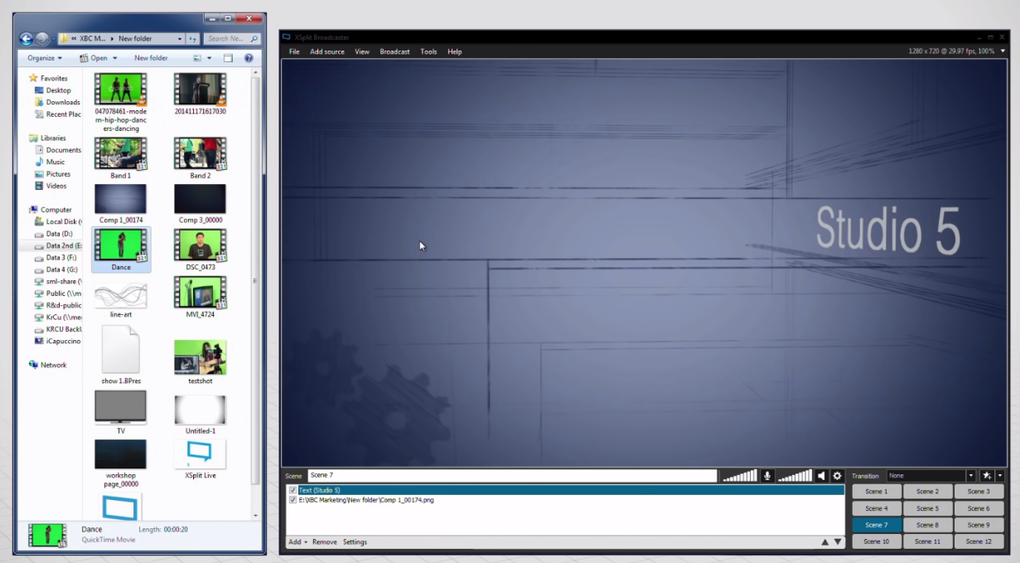
Once inside the main interface, click the “+” button in the Scenes panel to create a new scene. Drag sources (Game Capture, Video Capture Device, Image, Media File, etc.) onto the canvas, resize, and arrange them as needed. To add a webcam overlay, select “Video Capture Device,” choose your webcam from the dropdown, and position it in a corner.
For a live alert, add the “Browser Source” and paste the URL provided by your alert service. You can switch between scenes during a broadcast by clicking the corresponding scene name or assigning keyboard shortcuts. When you’re ready, hit the “Broadcast” button, select the destination platform, and go live.
The built‑in encoder will handle real‑time compression, while the stats panel monitors FPS, dropped frames, and CPU usage.
Compatibility Across Windows, macOS, and Mobile Devices
XSplit Broadcaster is officially supported on Windows 10 and later (64‑bit). The application leverages DirectX 11 and Windows Media Foundation for optimal performance, making it the most stable choice on PC. While a native macOS version is not currently available, macOS users can run XSplit through Boot Camp or a Windows virtual machine.
Mobile platforms (Android, iOS) are covered by the companion app XSplit Broadcaster Remote, which allows you to control scenes, trigger hotkeys, and monitor stream health from a smartphone or tablet. For capture‑card users, ensure your device supports DirectShow or OBS‑compatible drivers to avoid frame‑rate drops. Minimum hardware recommendations include a quad‑core CPU, 8 GB RAM, and a dedicated GPU that supports NVENC or AMD VCE for hardware encoding.
Pros, Cons, Frequently Asked Questions, and Expert Review
Pros & Cons
- Pros:
- Intuitive drag‑and‑drop interface perfect for beginners.
- Robust free tier with essential streaming features.
- Excellent integration with Twitch, YouTube, and third‑party alert services.
- Hardware‑accelerated encoding reduces CPU impact.
- Extensible via plugins and custom scripts.
- Cons:
- Full feature set requires a paid license (premium subscription).
- Limited native support for macOS; requires workarounds.
- Occasional latency with certain capture cards.
- Social‑media alert synchronization can be inconsistent.
- Interface may feel cluttered for users accustomed to ultra‑minimalist tools.
Frequently Asked Questions (FAQ)
Is XSplit Broadcaster free to use?
Yes, XSplit offers a free version with a limited license that includes core streaming functions, scene creation, and basic overlays. Advanced features such as premium plugins, higher resolution output, and priority support require a paid subscription.
Which operating systems are supported?
XSplit Broadcaster runs natively on Windows 10/11 (64‑bit). macOS users can run it via Boot Camp or a virtual machine, while mobile devices are supported through the remote control app for Android and iOS.
Can I stream to multiple platforms at once?
Absolutely. XSplit Broadcaster includes multi‑streaming capabilities that let you broadcast simultaneously to Twitch, YouTube, Facebook Live, and custom RTMP servers without extra plugins.
What capture cards are compatible?
Most HDMI/USB capture cards that provide DirectShow or OBS‑compatible drivers work with XSplit. Popular models from Elgato, AVerMedia, and Razer are tested and supported. Some lower‑end cards may cause reduced frame rates, so checking the official compatibility list is recommended.
How does XSplit affect game performance?
When hardware encoding (NVENC/AMD VCE) is enabled, the impact on game FPS is minimal because the GPU handles video compression. Using software encoding (CPU‑based) can increase CPU load and potentially lower performance, especially on older systems.
Expert Review
After extensive testing across several gaming rigs and streaming setups, XSplit Broadcaster proves itself as a reliable, feature‑rich platform that balances ease of use with professional capabilities. The scene‑based workflow accelerates production, while the built‑in audio mixer and alert system keep audiences engaged. Performance remains stable thanks to hardware‑accelerated encoding, though users with older capture cards may notice occasional hiccups. The free tier is generous enough for newcomers, and the premium upgrade unlocks powerful plugins and higher output resolutions. Overall, XSplit earns a solid rating for versatility, community support, and consistent updates.
Conclusion – Should You Download XSplit Broadcaster?
If you are looking for a secure, free (with optional premium upgrades) streaming tool that can handle everything from simple game captures to multi‑camera productions, XSplit Broadcaster is a top contender. Its intuitive interface reduces the learning curve for beginners, while the extensive plugin ecosystem satisfies power users. Compatibility with Windows, a wide range of capture devices, and seamless integration with Twitch, YouTube, and social‑media alerts make it a one‑stop solution for most streamers. The few drawbacks—lack of native macOS support and occasional capture‑card quirks—are outweighed by its strengths. Download XSplit Broadcaster today, set up your first scene, and experience a smooth transition from preparation to live broadcast.
Download XSplit Broadcaster now and start creating professional‑grade streams for free!







